10.2 Spring Boot中全局异常的使用
在实际工作中,我们大部分时间在使用Spring Boot开发Web应用(当然,最经常使用到的是框架是Spring MVC)。由于和用户多有交互,所以在请求的过程中,发生错误异常是很常见的。Spring Boot为我们提供了一套默认的异常/错误处理机制,帮助我们来处理交互过程中的异常/错误。
官方文档,对错误处理的描述如下:
By default, Spring Boot provides an
/errormapping that handles all errors in a sensible way, and it is registered as a “global” error page in the servlet container. For machine clients, it produces a JSON response with details of the error, the HTTP status, and the exception message. For browser clients, there is a “whitelabel” error view that renders the same data in HTML format (to customize it, add aViewthat resolves toerror). To replace the default behavior completely, you can implementErrorControllerand register a bean definition of that type or add a bean of typeErrorAttributesto use the existing mechanism but replace the contents.
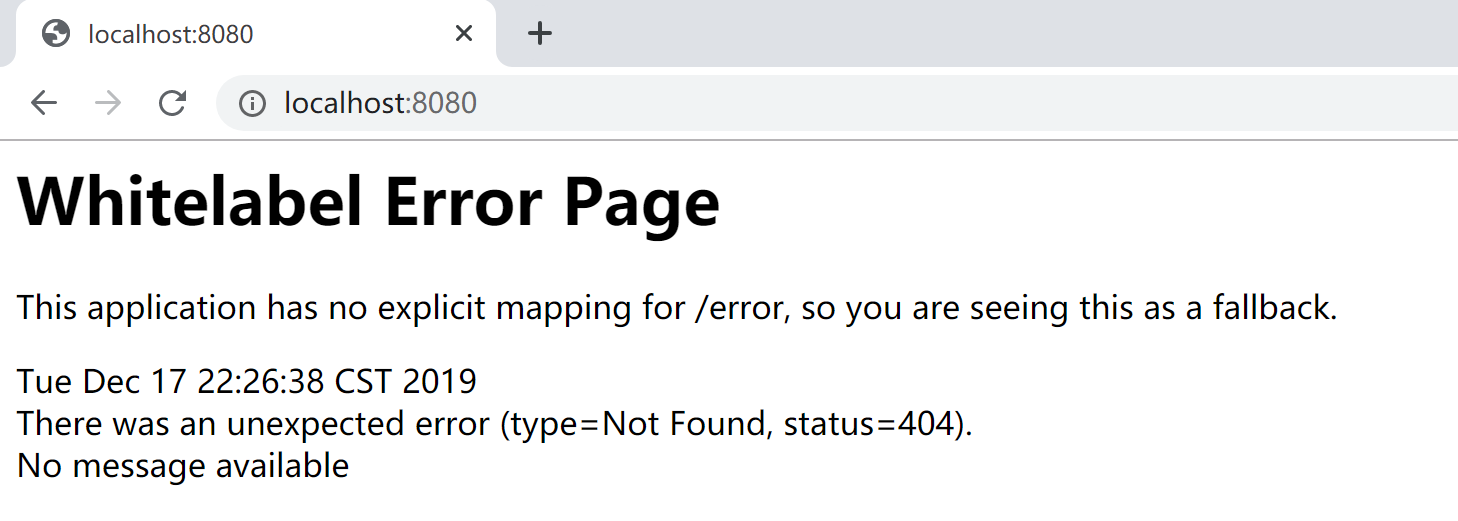
例如,当我们通过浏览器访问一个不存在的url地址时,服务器就产生一个“404 Not Found”错误,Spring Boot提供的默认映射“/error”就起作用了,在这个请求中处理“404 Not Found”然后通过为该请求配置的默认全局错误页面来展示错误信息。
Spring Boot默认在没有找到对应的Controller处理器方法(handler not found)的情况下,不会直接报错,而是通过向Servlet容器(如Tomcat)设置错误报告属性,然后Servlet容器发现错误(例如,http status=404),就查找默认“/error” 这个路径,Spring Boot就接管后续全局统一异常处理。
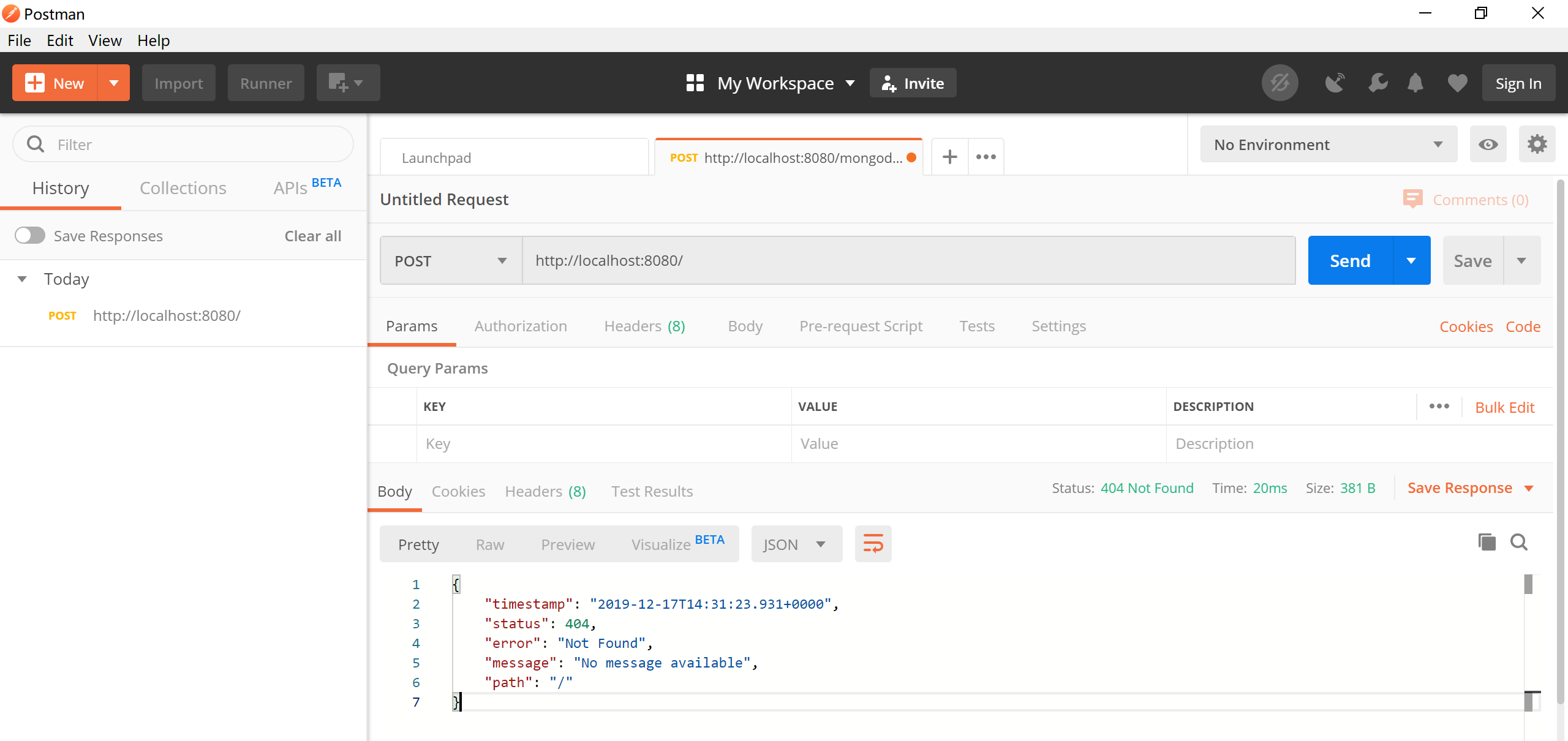
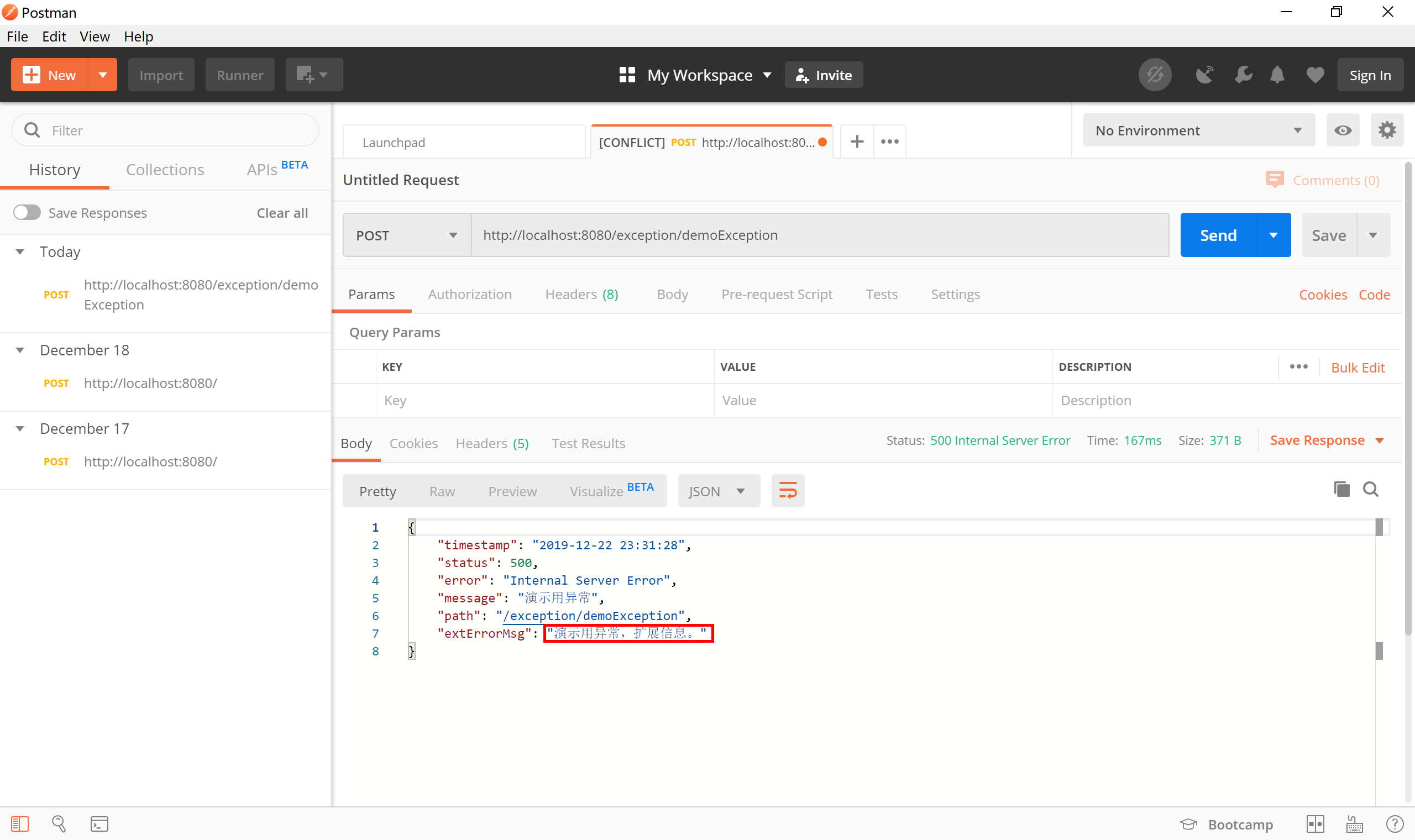
如果是通过Postman之类的工具以Post方式访问,Spring Boot的默认全局异常处理机制则会返回一段json信息。
10.2.1 Spring Boot默认全局异常
在Spring Boot提供的org.springframework.boot.autoconfigure.web.servlet.error.ErrorMvcAutoConfiguration类通过自动配置错误处理Bean,为Web容器提供了默认的全局异常处理机制。
...
@Bean//1.DefaultErrorAttributes
@ConditionalOnMissingBean(value = ErrorAttributes.class, search = SearchStrategy.CURRENT)
public DefaultErrorAttributes errorAttributes() {
    return new DefaultErrorAttributes(this.serverProperties.getError().isIncludeException());
}

@Bean//2.BasicErrorController
@ConditionalOnMissingBean(value = ErrorController.class, search = SearchStrategy.CURRENT)
public BasicErrorController basicErrorController(ErrorAttributes errorAttributes,
                                                 ObjectProvider<ErrorViewResolver> errorViewResolvers) {
    return new BasicErrorController(errorAttributes, this.serverProperties.getError(),
                                    errorViewResolvers.orderedStream().collect(Collectors.toList()));
}

@Bean//3.ErrorPageCustomizer
public ErrorPageCustomizer errorPageCustomizer(DispatcherServletPath dispatcherServletPath) {
    return new ErrorPageCustomizer(this.serverProperties, dispatcherServletPath);
}
...

@Configuration(proxyBeanMethods = false)
static class DefaultErrorViewResolverConfiguration {

    private final ApplicationContext applicationContext;

    private final ResourceProperties resourceProperties;

    DefaultErrorViewResolverConfiguration(ApplicationContext applicationContext,
                                          ResourceProperties resourceProperties) {
        this.applicationContext = applicationContext;
        this.resourceProperties = resourceProperties;
    }

    @Bean//4.DefaultErrorViewResolver
    @ConditionalOnBean(DispatcherServlet.class)
    @ConditionalOnMissingBean(ErrorViewResolver.class)
    DefaultErrorViewResolver conventionErrorViewResolver() {
        return new DefaultErrorViewResolver(this.applicationContext, this.resourceProperties);
    }

}

@Configuration(proxyBeanMethods = false)
@ConditionalOnProperty(prefix = "server.error.whitelabel", name = "enabled", matchIfMissing = true)
@Conditional(ErrorTemplateMissingCondition.class)
protected static class WhitelabelErrorViewConfiguration {

    private final StaticView defaultErrorView = new StaticView();

    @Bean(name = "error")//将StaticView(就是Whitelabel错误页面)配置为error
    @ConditionalOnMissingBean(name = "error")
    public View defaultErrorView() {
        return this.defaultErrorView;
    }

...
10.2.1.1 DefaultErrorAttributes
其中配置的org.springframework.boot.web.servlet.error.DefaultErrorAttributes类,为我们提供了在页面共享信息的“getErrorAttributes”方法。
@Override
public Map<String, Object> getErrorAttributes(WebRequest webRequest, boolean includeStackTrace) {
    Map<String, Object> errorAttributes = new LinkedHashMap<>();
    errorAttributes.put("timestamp", new Date());
    addStatus(errorAttributes, webRequest);
    addErrorDetails(errorAttributes, webRequest, includeStackTrace);
    addPath(errorAttributes, webRequest);
    return errorAttributes;
}
10.2.1.2 BasicErrorController
其中配置的org.springframework.boot.autoconfigure.web.servlet.error.BasicErrorController类,根据请求头的不同,提供了不同的方法处理默认/error请求。
- 普通html请求使用errorHtml方法,返回error错误页面并携带错误数据。
- 其他的请求(例如Postman发起的请求)使用error方法,返回json数据。
@RequestMapping("${server.error.path:${error.path:/error}}"):这是一个三元写法,如果你在配置文件配置了server.error.path的话,就会使用你配置的异常处理地址,如果没有就会使用你配置的error.path路径地址,如果还是没有,默认使用/error来作为发生异常的处理地址。
@Controller
@RequestMapping("${server.error.path:${error.path:/error}}")//拦截/error请求
public class BasicErrorController extends AbstractErrorController {
...
@RequestMapping(produces = MediaType.TEXT_HTML_VALUE)//处理浏览器请求,返回错误html页面
public ModelAndView errorHtml(HttpServletRequest request, HttpServletResponse response) {
    HttpStatus status = getStatus(request);
    Map<String, Object> model = Collections
        .unmodifiableMap(getErrorAttributes(request, isIncludeStackTrace(request, MediaType.TEXT_HTML)));
    response.setStatus(status.value());
    ModelAndView modelAndView = resolveErrorView(request, response, status, model);
    return (modelAndView != null) ? modelAndView : new ModelAndView("error", model);
}

@RequestMapping//处理“machine clients”请求,例如Postman发起的请求,返回json数据
public ResponseEntity<Map<String, Object>> error(HttpServletRequest request) {
    HttpStatus status = getStatus(request);
    if (status == HttpStatus.NO_CONTENT) {
        return new ResponseEntity<>(status);
    }
    Map<String, Object> body = getErrorAttributes(request, isIncludeStackTrace(request, MediaType.ALL));
    return new ResponseEntity<>(body, status);
}
例如,我们在浏览器中访问了一个不存在的url,Spring MVC将其错误信息封装到DefaultErrorAttributes(由getErrorAttributes方法提供数据),然后将其转发到“/error”请求,由BasicErrorController.errorHtml方法接管处理。
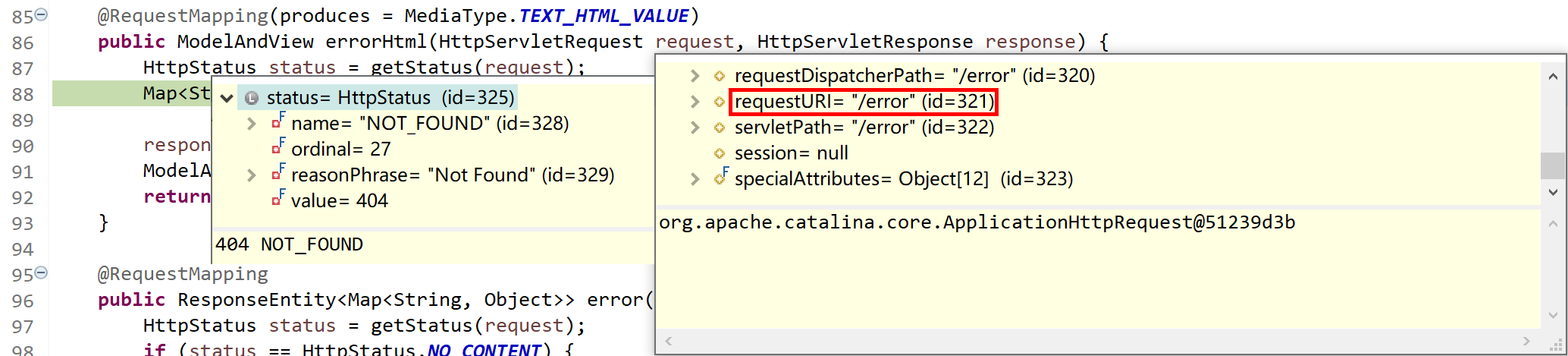
其中的org.springframework.boot.autoconfigure.web.servlet.error.ErrorMvcAutoConfiguration.StaticView类的“render”方法提供的就是我们经常能够看到的“Whitelabel Error Page”页面。
private static class StaticView implements View {

    private static final MediaType TEXT_HTML_UTF8 = new MediaType("text", "html", StandardCharsets.UTF_8);

    private static final Log logger = LogFactory.getLog(StaticView.class);

    @Override
    public void render(Map<String, ?> model, HttpServletRequest request, HttpServletResponse response)
        throws Exception {
        if (response.isCommitted()) {
            String message = getMessage(model);
            logger.error(message);
            return;
        }
        response.setContentType(TEXT_HTML_UTF8.toString());
        StringBuilder builder = new StringBuilder();
        Date timestamp = (Date) model.get("timestamp");
        Object message = model.get("message");
        Object trace = model.get("trace");
        if (response.getContentType() == null) {
            response.setContentType(getContentType());
        }
        builder.append("<html><body><h1>Whitelabel Error Page</h1>").append(
            "<p>This application has no explicit mapping for /error, so you are seeing this as a fallback.</p>")
            .append("<div id='created'>").append(timestamp).append("</div>")
            .append("<div>There was an unexpected error (type=").append(htmlEscape(model.get("error")))
            .append(", status=").append(htmlEscape(model.get("status"))).append(").</div>");
        if (message != null) {
            builder.append("<div>").append(htmlEscape(message)).append("</div>");
        }
        if (trace != null) {
            builder.append("<div style='white-space:pre-wrap;'>").append(htmlEscape(trace)).append("</div>");
        }
        builder.append("</body></html>");
        response.getWriter().append(builder.toString());
    }
...
10.2.1.3 ErrorPageCustomizer
其中的org.springframework.boot.autoconfigure.web.servlet.error.ErrorMvcAutoConfiguration.ErrorPageCustomizer类,在Spring Boot(Spring MVC)应用启动时,读取server.error.path配置属性,注册ErrorPage,在应用出现异常(比如404)时就能找到对应的页面(/error)进行处理。
private static class ErrorPageCustomizer implements ErrorPageRegistrar, Ordered {

    private final ServerProperties properties;

    private final DispatcherServletPath dispatcherServletPath;

    protected ErrorPageCustomizer(ServerProperties properties, DispatcherServletPath dispatcherServletPath) {
        this.properties = properties;
        this.dispatcherServletPath = dispatcherServletPath;
    }

    @Override
    public void registerErrorPages(ErrorPageRegistry errorPageRegistry) {
        ErrorPage errorPage = new ErrorPage(
            this.dispatcherServletPath.getRelativePath(this.properties.getError().getPath()));
        //this.properties.getError().getPath()=server.error.path=error(默认值)
        errorPageRegistry.addErrorPages(errorPage);
    }

    @Override
    public int getOrder() {
        return 0;
    }

}
10.2.1.4 DefaultErrorViewResolver
其中的org.springframework.boot.autoconfigure.web.servlet.error.DefaultErrorViewResolver类,完成默认的错误视图解析工作。
@Override
public ModelAndView resolveErrorView(HttpServletRequest request, HttpStatus status, Map<String, Object> model) {
    ModelAndView modelAndView = resolve(String.valueOf(status.value()), model);
    if (modelAndView == null && SERIES_VIEWS.containsKey(status.series())) {
        modelAndView = resolve(SERIES_VIEWS.get(status.series()), model);
    }
    return modelAndView;
}

private ModelAndView resolve(String viewName, Map<String, Object> model) {
    //Spring Boot去找到一个处理错误的页面,例如error/404
    String errorViewName = "error/" + viewName;
    TemplateAvailabilityProvider provider = this.templateAvailabilityProviders.getProvider(errorViewName,
                                                                                           this.applicationContext);
    if (provider != null) {
        return new ModelAndView(errorViewName, model);
    }
    return resolveResource(errorViewName, model);
}
...
10.2.1.5 全局异常处理过程
默认情况下,Web应用一旦出现错误,Spring Boot全局异常体系就接管该错误,并按照如下步骤进行处理:
- 系统启动时ErrorPageCustomizer注册错误处理页面,并准备为异常服务;
- 一但系统出现4xx或者5xx之类的错误,“/error”请求会被BasicErrorController处理,根据请求头的不同,返回页面或json数据;
- 在返回页面的情况下,由DefaultErrorViewResolver解析得到由ErrorPageCustomizer注册的响应页面,如果没有指定页面,BasicErrorController就使用"error"视图;
- "error"视图是由StaticView这个类提供的“Whitelabel Error Page”页面。
10.2.1.6 跟踪代码,加深理解
为了理解Spring Boot在Spring MVC应用中提供的全局异常处理机制,建议读者以调试方式启动Spring Boot应用,通过浏览器访问一个不存在的地址(例如http://localhost:8080/good),跟踪代码,加深理解。
- 在
org.springframework.web.servlet.DispatcherServlet.doDispatch方法处设置断点; - 在
org.apache.catalina.core.StandardHostValve.status方法处设置断点; - 在
org.springframework.boot.autoconfigure.web.servlet.error.BasicErrorController.errorHtml方法处设置断点; - 在
org.springframework.boot.autoconfigure.web.servlet.error.DefaultErrorViewResolver.resolve方法处设置断点;
然后跟踪代码:
- 第1次进入doDispatch方法,是浏览器发起的,观察request的attributes中的值
org.springframework.web.servlet.HandlerMapping.lookupPath=/good,DispatcherType=REQUEST; - 然后进入status方法,tomcat设置statusCode=404,ErrorPage[errorCode=0, location=/error],然后转发错误请求“/error”;
- 第2次进入doDispatch方法,观察request的dispatcherType=DispatcherType.ERROR,servletPath=/error;匹配的mappedHandler=org.springframework.boot.autoconfigure.web.servlet.error.BasicErrorController.errorHtml;
- 后续就由errorHtml方法接管错误处理了。在
ModelAndView modelAndView = resolveErrorView(request, response, status, model)查找对应的视图(view),我们没有指定视图的情况下返回null,然后在return (modelAndView != null) ? modelAndView : new ModelAndView("error", model)代码处为指定Model为“error”(ModelAndView("error", model)); - 浏览器得到“Whitelabel Error Page”错误页面。
10.2.2 自定义全局异常
在SpringBoot 统一异常处理的做法主要有两种:一是使用注解ExceptionHandler处理某个特定的异常类,二是实现接口ErrorController或继承扩展AbstractErrorController类(BasicErrorController就继承自这个类)。
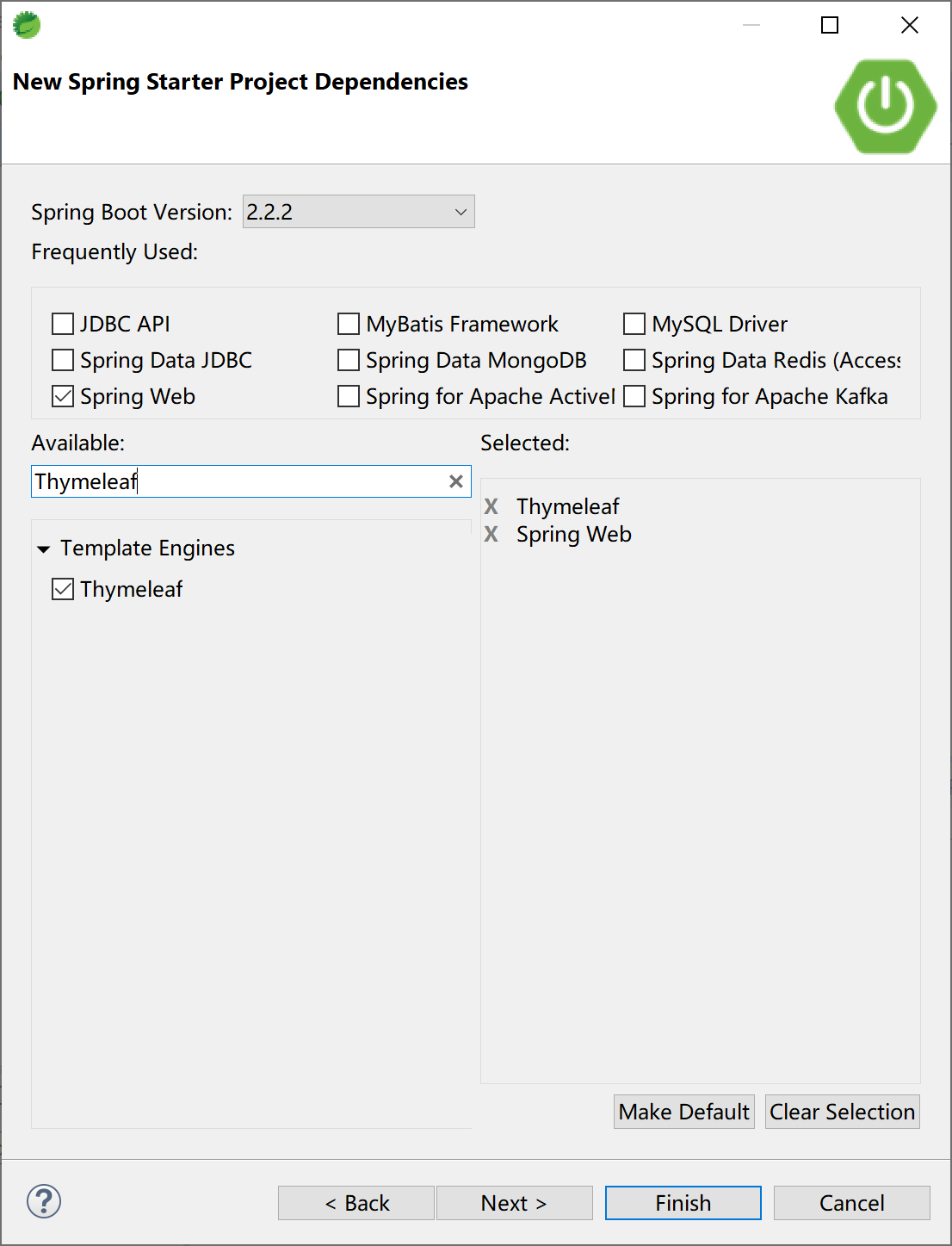
本小节使用“Thymeleaf模板引擎+Spring MVC”的Spring Boot应用,来讲解提供自定义错误页面进行如何优雅的全局异常处理。
10.2.2.1 自定义错误页面
在resources/templates下面创建error.html页面,内容如下:
<!DOCTYPE html>
<html xmlns:th="http://www.thymeleaf.org">
<head>
<meta charset="UTF-8">
<title>哦豁</title>
</head>
<body>
    发生错误啦!(使用Thymeleaf动态错误页面)
    <p th:text="${'错误:'+error}"></p>
    <p th:text="${'错误码:'+status}"></p>
    <p th:text="${'错误信息:'+message}"></p>
</body>
</html>
如果要细分错误码(如404,500)则在resources/templates/error下创建对应的页面,如500.html,内容如下:
<!DOCTYPE html>
<html xmlns:th="http://www.thymeleaf.org">
<head>
<meta charset="UTF-8">
<title>哦豁</title>
</head>
<body>
    发生“服务器内部”错误啦!(使用Thymeleaf动态错误页面)
    <p th:text="${'错误:'+error}"></p>
    <p th:text="${'错误码:'+status}"></p>
    <p th:text="${'错误信息:'+message}"></p>
</body>
</html>
404.html:
<!DOCTYPE html>
<html xmlns:th="http://www.thymeleaf.org">
<head>
<meta charset="UTF-8">
<title>哦豁</title>
</head>
<body>
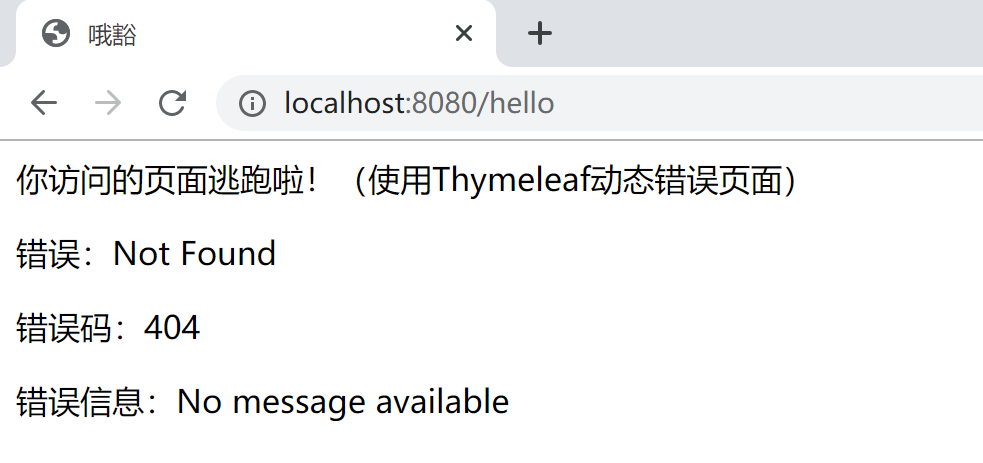
    你访问的页面逃跑啦!(使用Thymeleaf动态错误页面)
    <p th:text="${'错误:'+error}"></p>
    <p th:text="${'错误码:'+status}"></p>
    <p th:text="${'错误信息:'+message}"></p>
</body>
</html>
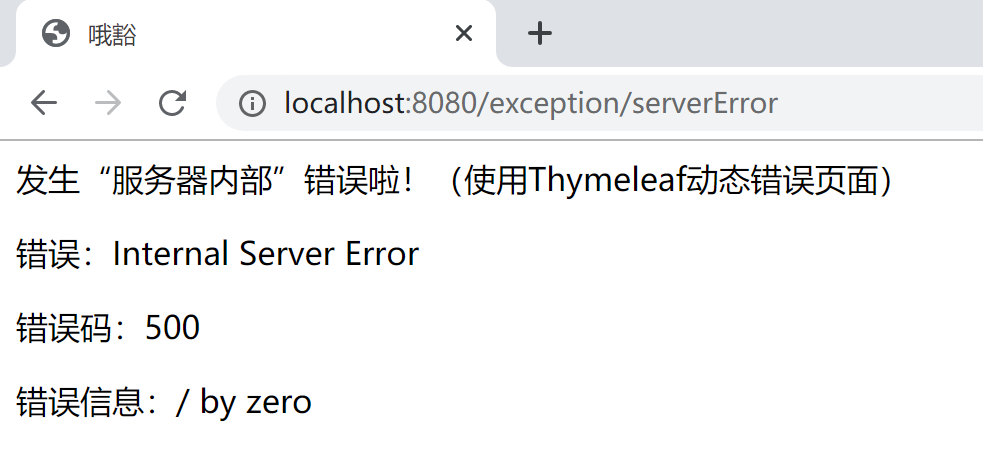
通过一个Controller方法,内部除0发生异常,来测试500错误:
package com.example.exception.foo.controller;

import org.springframework.web.bind.annotation.RequestMapping;
import org.springframework.web.bind.annotation.RestController;

@RestController
@RequestMapping("/exception/")
public class TestController {

    @RequestMapping("/serverError")
    public String serverError() {
        double d = 100/0;
        return "error" + d;
    }

}
浏览器访问http://localhost:8080/exception/serverError,由500.html响应的效果如下:
浏览器访问http://localhost:8080/hello,由404.html响应的效果如下:
10.2.2.2 扩展DefaultErrorAttributes类
如果我们需要在错误发生的时候,生成(或提供)更多的信息,可以扩展Spring Boot提供的DefaultErrorAttributes类,在其中添加额外的错误信息。
package com.example.exception.component;

import java.util.Map;

import org.springframework.boot.web.servlet.error.DefaultErrorAttributes;
import org.springframework.stereotype.Component;
import org.springframework.web.context.request.WebRequest;

@Component
public class ExErrorAttributes extends DefaultErrorAttributes {

    @Override
    public Map<String, Object> getErrorAttributes(WebRequest webRequest, boolean includeStackTrace) {
        Map<String, Object> errorAttributes = super.getErrorAttributes(webRequest, includeStackTrace);
// 从ExExceptionHandler中传递过来的额外异常信息,放入到errorAttributes中,供后续错误处理页面用。
        String msg = (String) webRequest.getAttribute("extErrorMsg", 0);
        errorAttributes.put("extErrorMsg", msg);
        return errorAttributes;
    }
}
10.2.2.3 自定义异常处理类
创建一个异常类DemoException,用来演示抛出异常。
package com.example.exception.component;

public class DemoException extends RuntimeException {

    private static final long serialVersionUID = -9185062164416168469L;

    public DemoException() {
        super("演示用异常");
    }
}
自定义一个异常处理类,专门处理DemoException异常:
package com.example.exception.component;

import javax.servlet.http.HttpServletRequest;

import org.springframework.web.bind.annotation.ControllerAdvice;
import org.springframework.web.bind.annotation.ExceptionHandler;

@ControllerAdvice
public class ExExceptionHandler {

    @ExceptionHandler(DemoException.class)
    public String handleException(Exception e, HttpServletRequest request) {
        request.setAttribute("javax.servlet.error.status_code", 500);
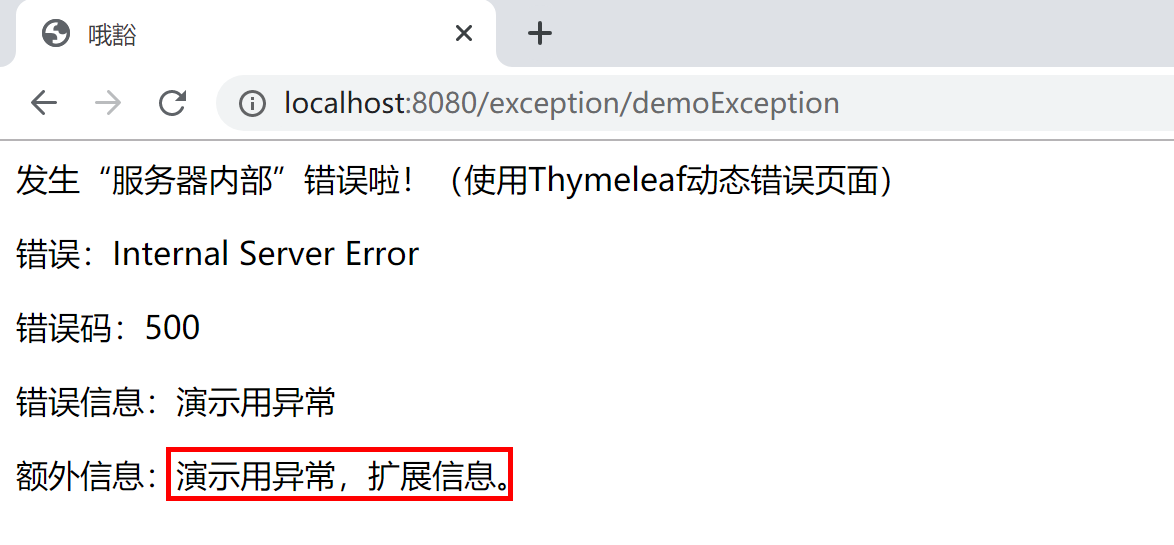
        request.setAttribute("extErrorMsg", "演示用异常,扩展信息。");
        return "forward:/error";
    }

}
102.2.4 测试
在控制器TestController中添加一个方法,其内部抛出DemoException,测试。
package com.example.exception.foo.controller;

import org.springframework.web.bind.annotation.RequestMapping;
import org.springframework.web.bind.annotation.RestController;

import com.example.exception.component.DemoException;

@RestController
@RequestMapping("/exception/")
public class TestController {

    @RequestMapping("/demoException")
    public String serverError() {
        throw new DemoException();
    }

    @RequestMapping("/serverError")
    public String serverError2() {
        double d = 100/0;
        return "error" + d;
    }
}
打开浏览器访问http://localhost:8080/exception/demoException,验证自定义异常的处理效果。
使用Postman发起请求,同样能够得到期望的异常信息。
本小节示例项目代码:
https://github.com/gyzhang/SpringBootCourseCode/tree/master/spring-boot-exception